


 |
MRC Manager
- Product description
- Delivery cost calculator
- Wholesale orders
- Files to download
- Product safety information
Check all those features for free - register now at https://rms.mrcmanager.com
Features:
- Real-time monitoring of your shop transactions and activities from anywhere.
- Web based software, so no extra hassle of installation or any kind of fear of data loss.
- Use from anywhere. You can use our software for service center and field service both.
- Create unlimited worker/ technician.
- Set your own Currency, VAT & TAX.
- Write your own terms & conditions on Check-In Receipt & Invoices.
- Responsive printing layouts. Use any size of paper.
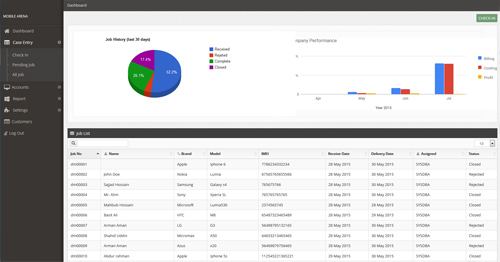
- Fast & easy work order creation, invoicing and billing.
- Easy Job Finder. Find any job by job number, customer name, IMEI number, brand, model.
- Unbranded website for your customers to check job status online by entering the job number.
- Automatically change job status during repair process. Received > In Progress > Complete > Closed > Rejected.
- Automatic database builder for brands & models. Enter brand & model once and it will be stored to your database.
- Fault Management: Most of all knows faults are already in the software. You can add/remove or edit as well.
- Task Management: Most of all known repair actions are already in the software.
- Manual fault & task entry with costing and price for faster job processing.
- Adjust costing and pricing manually of any item/ task when processing any job.
- Get all pending/ under process jobs in once place.
- Filter jobs by: Jobs received, under process, completed, rejected or closed.
- Arrange jobs by: Received date, Delivery date, Customer name, Brand, Model, Job number.
- Receive advance payment when receiving a new job.
- Note maximum service charge that your customer can afford for the desired job.
- Note additional information when check-in, which is not related to the actual fault.
- Take a snapshot or Upload handset’s picture directly from webcam/digital camera in case of physically damaged unites.
- Complete activity history of all task’s performed in a single repair job with date and time.
- Perform & take note of initial check when receiving any job.
- Assign technician when receiving a job.
- Transfer Jobs between Technicians.

- Invoices are created automatically upon job completion.
- Manage all due invoices and receive payments.
- Refund customer in case of unsuccessful job.
- Automatic VAT/ TAX calculation.
- Receive full or partial payments.
- Give discount to your customers.
- Filter invoices by date range.
- Receive payments in cash/ card or via cheque. and record transaction ID.

- Most of all financial information with a single clicks.
- Complete information of your company’s transactions.
- Get invoice list and filter them by date range.
- Get sales Report by category. and filter them by date range.
- Get sales Report for all manually entered items. and filter them by date range.
- Full payment history by date range, invoice number, customer name, amount etc. etc.
- See income & profit by individual Category.
- TAX/ VAT are added automatically to your bill amount.
- Get work history by Technician.
- Income & Profit report by technician. Very useful if you have technician working as commission based.
- Export & E-Mail all reports to PDF.

- Manage and edit SMS/ E-Mail templates for customer notifications.
- Send SMS to customers on job completion or failed/rejected.
- Send E-Mail to customers on job completion or failed/rejected.
- Send Check-in receipt or invoice to your customer via E-mail.
- Send SMS to all or selected customers about new offer or promotions.
- Send E-mail to all or selected customers about new offer or promotions.
Currently supported languages are
1. French
2. Spanish
3. Portuguese
4. Russian
5. Italian
6. German
7. Romanian
8. Polish
9. Slovak
10. Chinese

Complete contains:
- licence for 1 year for MRC Manager
|
||
NEGOTIATE PRICE

Product placed on the market in the EU before December 13, 2024: YES
Warnings and Safety Guidelines for Software Use
Based on the requirements of Regulation (EU) 2023/988 on General Product Safety (GPSR), we present a list of safety warnings. The purpose is to protect users from potential hazards resulting from improper use of products/devices/software. The warnings are formulated in a simple and understandable way to ensure accessibility for a wide audience, including elderly people and individuals with mobility limitations.
List of hazards and safety precautions for software use
1. Risk of data loss or system damage
* Hazard: improper installation, deletion of system files, or lack of backups.
* Precautions: always perform regular backups; install software only from trusted sources.
2. Exposure to cyberattacks (viruses, malware)
* Hazard: downloading files from unverified websites, lack of antivirus protection.
* Precautions: use up-to-date antivirus programs, avoid opening suspicious email attachments, enable automatic updates.
3. Hardware overload and overheating
* Hazard: intensive software use (e.g., graphics processing, floating-point calculations, BF) may lead to device overheating.
* Precautions: use the device in a well-ventilated area, do not cover ventilation openings. If overheating occurs – turn off the device and wait several minutes for it to cool down.
4. Risk of electric shock and cuts (indirect)
* Hazard: although software itself poses no physical risk, improper use of computer equipment (e.g., touching cables in a damp environment) while using programs can be hazardous.
* Precautions: never operate computer devices with wet hands, avoid working in damp rooms, and regularly check cables and casings.
5. Health risks from prolonged use
* Hazard: eye strain, back pain, wrist and shoulder discomfort caused by long hours of computer work using office software.
* Precautions: take regular breaks every 45–60 minutes, use an ergonomic chair and keyboard, and position the monitor at eye level.
6. Dangers for children and inexperienced users
* Hazard: children may accidentally download harmful programs or share personal data.
* Precautions: enable parental controls, do not leave children unattended at the computer, and educate them about safe online behavior.
7. Problems in high-humidity or high-temperature environments
* Hazard: using software in high-temperature conditions (e.g., laptop on the lap in direct sunlight) or in humid environments (e.g., kitchen, bathroom) can cause hardware failure and indirect user risks.
* Precautions: use the equipment in suitable climate conditions, avoid using it near heat sources or in high-humidity areas.
8. Risks related to maintenance and updates
* Hazard: lack of software updates may create security vulnerabilities – unskilled attempts to modify the system may result in data loss.
* Precautions: always install official updates; do not modify system files without technical knowledge. Use authorized service support.
Importance of Following Warnings
Adhering to the above warnings minimizes the risk of bodily injury, equipment failure, and material loss. Ignoring these recommendations may lead to serious health and property hazards. Ensure your safety and that of others by following the indicated precautions. Detailed warnings or safety information about the product can be found in the user manual included with the product or available as a PDF on the manufacturer’s/supplier’s website.
Other products from same category
 + |
WGSM.pl 2.0- licence for 1 month
more
|
|
 + |
Martech Service Manager 1.1
more
|
|
This product was bought most often with:
 + |
Solder S-Sn60Pb40-SW26 (LC60) Q 0.25 100g
more
|
Price:
14.00 EUR w/o VAT |
 + |
Kontakt IPA fluid for Ultrasonic unit 5L
more
|
Price:
46.00 EUR w/o VAT |
 + |
Miernik uniwersalny KEMOT KT890
more
|
Price:
12.00 EUR w/o VAT |
 + |
Opening GSM tool XF-S
more
|
Price:
2.50 EUR w/o VAT |
 + |
Liquid for ultrasonic cleaners TERMOSONIK PCB 1L
more
|
Price:
13.00 EUR w/o VAT |
 + |
PCB cleaner (water based) 5L
more
|
Price:
13.20 EUR w/o VAT |
 + |
Solder liquid flux RF 800 - 1L
more
|
Price:
29.50 EUR w/o VAT |
Note
1. Offered by us accessories and replacement parts are not original phone producer parts, but they have been carefully choosen from list of producers to offer highest quality.
2. Our company sale only hardware/HASP/Box - not software for it. Software can be found and downloaded directly from producers webpage.
3. All trademarks mentioned on this site are property of their respective companies. Including product names, logos, commercial symbols, trade names and slogans are trademarks of those respective or related companies, and are protected by international trademark laws, and they are used here only for information purpose.


