


|
Main page > Data and Unlock Cables // Xpin Clip, IP BOX, MFC > OS800 Adapter for XPIN Clip (iOS 8.0 - 8.1)
|
 |
OS800 Adapter for XPIN Clip (iOS 8.0 - 8.1)
- Product description
- Delivery cost calculator
- Wholesale orders
- Files to download
- Product safety information
Features:
- Read PassCode of phones based on IOS 8.0 - 8.1 without disassembly phone
- Bypass enablding trigger removing data at 10 times the incorrect code is entered
Timing between entering next passcode after restart:
- iPhone 4S - 60 sek
- iPhone 5/5S - 50 sek
- iPhone 6/6+ - 40 sek
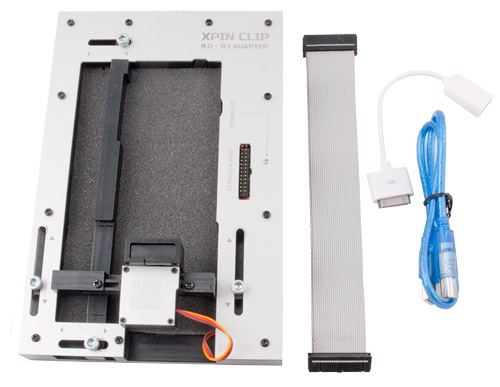
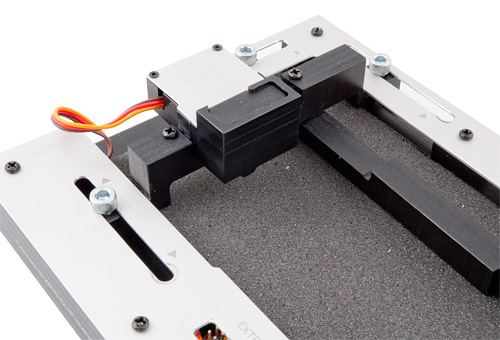
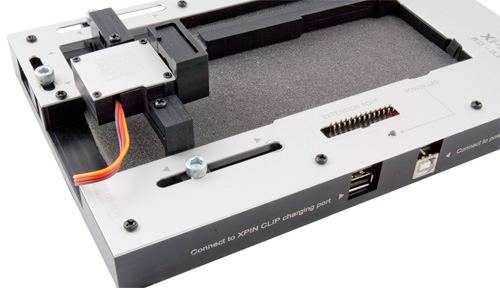
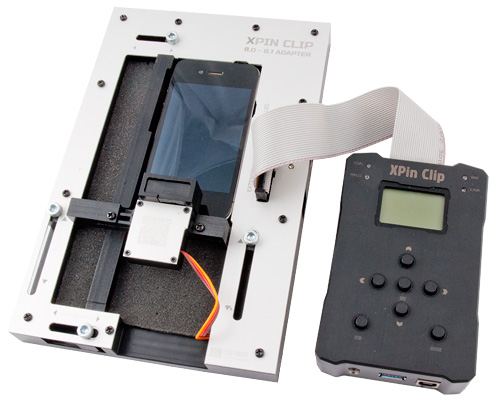
Note: 30 pin connector in 3in1 cable that is selling with XPIN Clip not working with unlimited attempts method. With Adapter iOS 8.0 - 8.1 you get other 30 pin USB HOST cable that working with this method (charging is not available).
Instruction for OS 800
1. Place the phone into the adapter and using clamps fix phone into adapter
2. Connect the power adapter to OS800 - USB B
3. Use the USB cable to connect the OS 800 adapter to the Charging port in XPIN Clip
4. Connect expansion port in Clip with connector on OS 800
5. After you successfully connect and press SET button on XPIN clip, all servos responsible for pressing the HOME and POWER, will set to the default position.
6. Connect via USB HOST cable (30 or 8 pin depending on the phone) iPhone with XPIN clip
7. Your phone should show the message that XPIN Clip has been detected
8. Go to the menu 8.0-8.1 IOS in XPN then go to submenu HEIGHT and press the SET button, start the procedure of setting height of HOME button on your phone using the DOWN button until the button is pressed. (Procedure best done on a blank screen when you press the HOME button the phone should awake) when this happens, press the SET button again
9. In the event of too strong tightening the HOME button, you can adjust the height of HEIGHT, pressing the SET button and use the UP lift the pressing frame.
10. To verify that the HOME button is set correctly, press the SET button when the phone responds again press the SET will lift the frame up, procedure must be repeated several times - if every time the HOME button is pressed, it means that it has been correctly set .
11. Go to submenu POWER BTN and select a page which is powering the phone (optional TOP - top, RIGHT - right) - make the selection by pressing the SET and directional up or down to select the desired button.
12. From the submenu PHONE selected phone model that has been placed in the adapter to the elections 4 / 4S 5 / 5S, 6 / 6P, we also changes by pressing the SET button.
NOTE: Parameters settings: 4 / 4S - 60 seconds 5 / 5S -50 seconds, 6 / 6P - 40 seconds (this is the interval after which followed the introduction of the next code to the phone and reset it) NOTE! These parameters MUST NOT be identical to the phone which is currently located in the adapter IOS 800, PHONE parameter can be used alternately, ie. Having placed in the adapter iPhone 6, you can choose 4 / 4S the waiting time for the next code will be set to 60 seconds.
Complete contains:
- adapter OS800
- USB A-B cable
- OTG 30 pin cable
|
||
NEGOTIATE PRICE

Product placed on the market in the EU before December 13, 2024: YES
Safety Warnings and Usage Guidelines
Based on the requirements of Regulation (EU) 2023/988 on General Product Safety (GPSR), we present a list of safety warnings. The aim is to protect users from potential hazards resulting from improper use of products/devices.
1. General Safety Measures
* Use the device only in accordance with its intended purpose and the manufacturer's instructions.
* Before first use, read the user manual carefully.
Hazards for children:
* Keep the product/device out of reach of children. Children are unable to assess existing risks.
2. Mechanical Hazards
* Check that all components are properly assembled before operating the device.
* Avoid using tools that may damage the product or contribute to its damage. Do not modify the product: do not open/disassemble it!
3. Electrical Hazards
* Connect only to a socket with the appropriate voltage, in accordance with the manufacturer’s requirements.
* Improper handling of products powered by mains voltage may result in fatal electric shock! If the product and/or the connection cable are damaged, do not touch them; there is a risk of fatal electric shock! Never use the device if the power cord is damaged, frayed, or cut. Avoid touching the power cord or plug with wet hands.
* Product with a separate power supply: before connecting the device to a plug-in or external power supply, ensure that the voltage, polarity (plus/+ and minus/-), and plug dimensions (e.g., inner/outer diameter) match the device.
* Product with a mains plug: the power outlet used for connection must be located near the product and easily accessible. Always unplug the power cord by pulling the plug, not the cable.
* Product with a power cord: the power cable must not be pinched, bent, or damaged by sharp edges. Do not place any objects on the power cord or step on it. The cable should always be arranged carefully to prevent tripping.
* Product intended for soldering: use only appropriate electronic solder and an electronic soldering iron. The soldering process should be performed quickly to avoid overheating and possible damage to the product.
4. Usage Precautions
* Place the product on a stable, flat surface to prevent it from tipping over.
* Always maintain sufficient space around the device (as recommended by the manufacturer) to ensure proper ventilation.
* The operation of certain products (e.g., machines or tools) requires the use of personal protective equipment to minimize health or other risks. This includes, for example, suitable hearing protection, an appropriate respirator/dust mask, or safety goggles, as well as proper gloves, safety footwear, and clothing.
5. Maintenance and Cleaning
* Before performing maintenance or cleaning, read the product’s user manual.
* Improper cleaning agents may not only damage the product but also cause other hazards — follow the manufacturer’s guidelines.
6. User Warnings
* Elderly persons or individuals with limited mobility should exercise particular caution when operating the product and, if necessary, seek assistance from another person.
* If the device operates abnormally (e.g., emits smoke, overheats, or produces unusual sounds), immediately switch it off, disconnect it from power, and contact authorized service.
* Store the product in a dry and cool place to prevent mechanical and electrical damage.
7. Disposal
* All electrical and electronic equipment placed on the European market must be properly disposed of. This means that, at the end of its service life, the device must be disposed of separately from unsorted household waste.
8. Importance of Following the Warnings
Following the above warnings minimizes the risk of personal injury, device malfunction, and material losses. Ignoring these recommendations may lead to serious health and material hazards. Protect yourself and your loved ones by following the indicated safety measures. Detailed warnings or product safety information are available in the user manual supplied with the product or in PDF format on the manufacturer’s/supplier’s website.
Dedicated equipments for this adapter:
 + |
XPIN Clip with cables set
more
|
Price:
399.00 EUR w/o VAT |
Other products from same category
 + |
XPIN upgrade firmware USB cable - A-A
more
|
Price:
3.49 EUR w/o VAT |
See also
 + |
reSTART Adapter for XPIN Clip
more
|
Price:
199.00 EUR w/o VAT |
 + |
Pattern Adapter for XPIN Clip
more
|
Price:
60.00 EUR w/o VAT |
You might also be interested in:
 + |
Charging Cable 3in1 for MFC Dongle
more
|
Price:
29.00 EUR w/o VAT |
|
+
|
Pattern Adapter for XPIN Clip
more
|
Price:
60.00 EUR w/o VAT |
 + |
XPIN Charging cable for Android
more
|
Price:
7.00 EUR w/o VAT |
 + |
TRC sensor light cable for XPIN Clip
more
|
Price:
7.00 EUR w/o VAT |
|
+
|
XPIN upgrade firmware USB cable - A-A
more
|
Price:
3.49 EUR w/o VAT |
 + |
Micro USB Cable - USB OTG with simultaneous charge for XPIN Clip
more
|
Price:
7.00 EUR w/o VAT |
 + |
Flat Tape for XPIN Clip Pattern Adapter
more
|
Price:
3.00 EUR w/o VAT |
 + |
Cable for Nokia C5-00 COMBO Rj45/RJ48 For JAF®/MT-Box 2in1
more
|
Price:
6.50 EUR w/o VAT |
This product was bought most often with:
|
+
|
Pattern Adapter for XPIN Clip
more
|
Price:
60.00 EUR w/o VAT |
|
+
|
XPIN Clip with cables set
more
|
Price:
399.00 EUR w/o VAT |
 + |
Activation set RT-82 for iPhone 6 6+ 5 5c 5s 4s 4 / iPad
more
|
Price:
19.00 EUR w/o VAT |
 + |
Cut Blade/Knife for OCA/LOCA MC-MM82 - 82mm
more
|
Price:
1.20 EUR w/o VAT |
 + |
LCD Opener long version
more
|
Price:
8.00 EUR w/o VAT |
 + |
iP-Box iOS8 Adapter
more
|
Price:
55.00 EUR w/o VAT |
 + |
Universal XC2B charging battery adapter
more
|
Price:
22.00 EUR w/o VAT |
Note
1. Offered by us accessories and replacement parts are not original phone producer parts, but they have been carefully choosen from list of producers to offer highest quality.
2. Our company sale only hardware/HASP/Box - not software for it. Software can be found and downloaded directly from producers webpage.
3. All trademarks mentioned on this site are property of their respective companies. Including product names, logos, commercial symbols, trade names and slogans are trademarks of those respective or related companies, and are protected by international trademark laws, and they are used here only for information purpose.


