


 |
XPIN Clip full set (CASE)
This product cannot be purchased using Paypal due to their restriction on computer surveillance products. Other payment methods available.
- Product description
- Delivery cost calculator
- Wholesale orders
- Files to download
- Product safety information


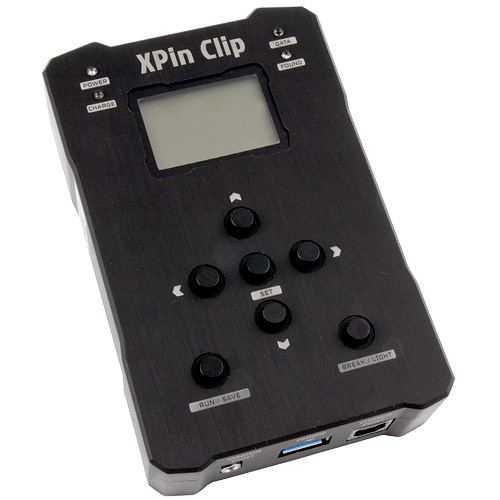
Functions and supported systems:
Recovery Methods:
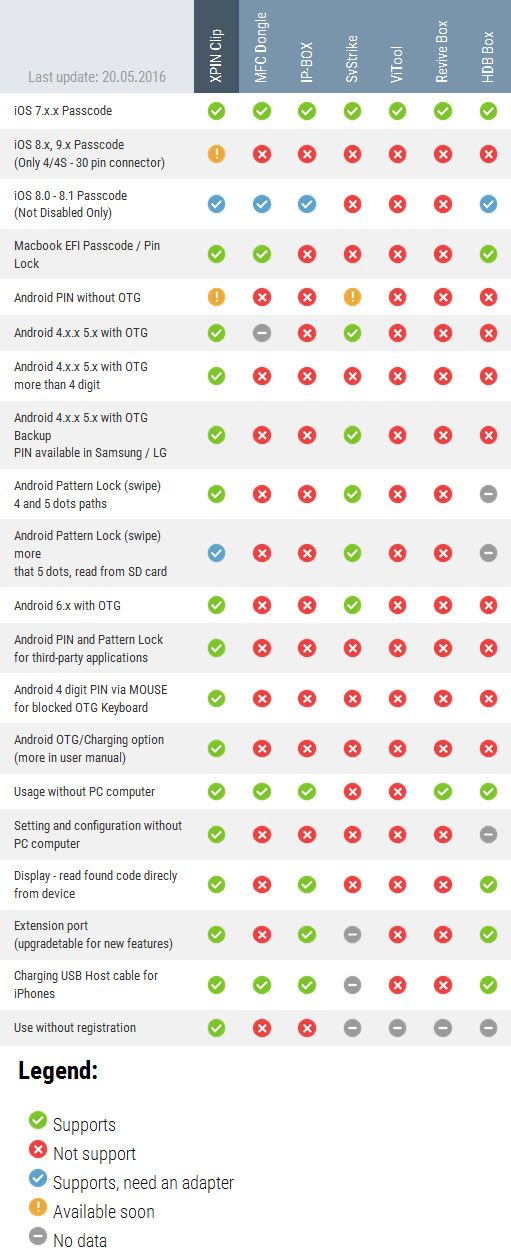
Compare function of XPIN to other devices on market:
Remove/Recovery Speed
- iOS Passcode - about 600 codes per hour
- iOS Passcode 8.0-8.1 - about 60codes per hour
- Macbook EFI - about 280codes per hour
- PIN Android OTG - about 550 codes per hour
- PatterLock Android OTG - about500 codes per hour
- Backup PIN Android 4.x.x (Samsung) - about 3600 codes per hour
- Backup PIN Android 5.x (Samsung) - about 550 codes per hour
- Backup PIN Android 4.X, 5.X, 6.X (LG) - about 3600codes per hour
- Android MOUSE PIN - about 470codes per hour
- Android PIN 6.X (30 SEC / 1 ATTEMPT) - about 120codes per hour
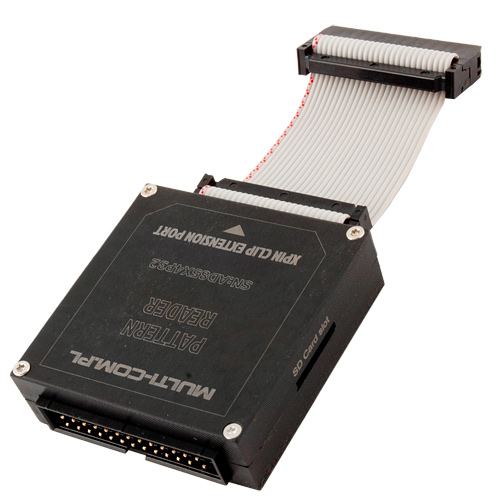
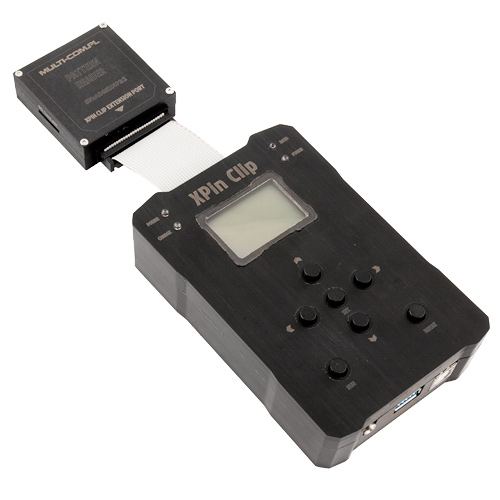
Pattern Adapter for XPIN Clip is additional adapter, which allows you to read patternlock of any length (from 4 to 9 points) on Android smartphones supported by XPIN Clip. Adapter allows also to configure the length and parameters of the patternlock so start point, end point as also exclude long pairs - all of those can be generated on http://xpinclip.com
Features:
- possibility to work with codes from 4 to 9 dots (as a standard XPIN support up to 5 dots from Pattern lock)
- possibility to configure start code and end code point
- possibility to exclude long pairs that are rarely used as 1 and 6 or 2 and 7 etc.
- possibility to copnnect adapters in chain when others adapters are available
Time of BG attack with diffrent combinations of codes: (approxiamlly 470 codes per hour)
(attack type, available codes to try, maximal time for attack)
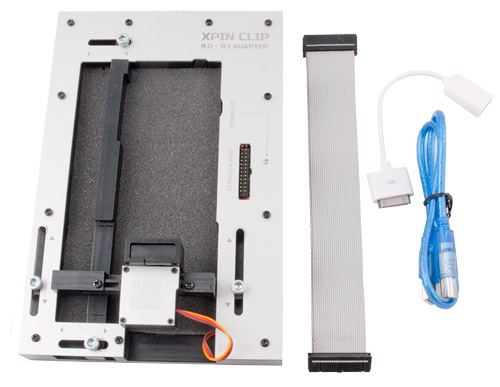
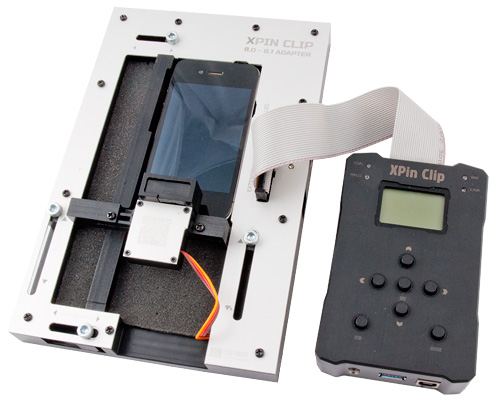
Adapter 8.0 - 8.1 for XPIN Clip is tool for remove passcode PIN from iPhone ruining on 8.0 - 8.1 iOS without disassemble phone. Adapter is compatible with iPhone 4, 4S, 5, 5S, 6, 6+. OS800 adapter use CVE-2014-4451 bug that allows on unlimited incorrect pin attempts on iOS by resetarting phone after enter wrong PIN.
Features:
- Read PassCode of phones based on IOS 8.0 - 8.1 without disassembly phone
- Bypass enablding trigger removing data at 10 times the incorrect code is entered
Timing between entering next passcode after restart:
- iPhone 4S - 60 sek
- iPhone 5/5S - 50 sek
- iPhone 6/6+ - 40 sek
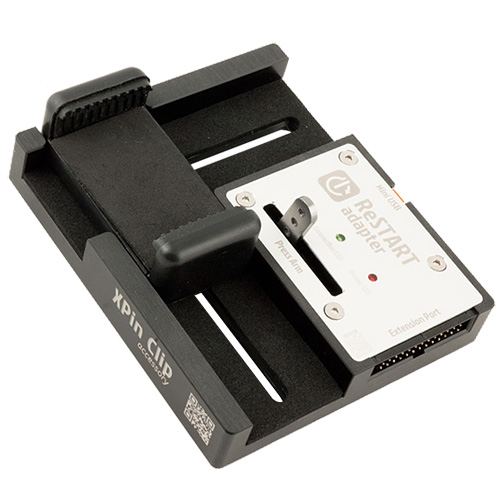
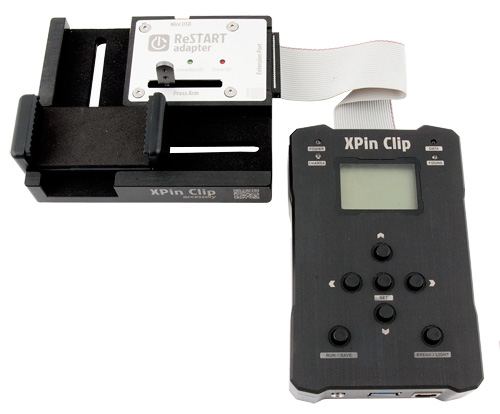
reSTART Adapter for XPIN Clip is used to restart phone with Android after a certain number of attempts to enter the code. Many Samsung Galaxy with a standard TouchWiz overlay has a bug, which cause jams of interface after approx. 25-50 entered codes which prevents the correct bruteforce attack on the PIN. Solution for this is restart phone after 10-20 codes. The adapter can also be used to reset the counter on Android phones 6.x.x, after entering the 10 codes, where each new code can be entered only after 30 seconds. Running phone again, we can again enter 10 codes (including the 30 seconds between successive 5 codes), so that the attack on the 4 pin code can be reduced from approximately 84 hours (120 codes per hour) to 24 hours (420 codes) take into account the average time to start a phone .
Features:
- Allows an attack on the PIN code preventing "jam" TouchWiz interface
- Shortens the time of the attack on some versions of Android 6.x.x
Specification
Models supported USB OTG
Acer
Liquid Gallant E350, Liquid X1, Iconia Tab A200/A500/A700, ICONIA A1-810
Archos
G9, Notion Ink Adam
Apple
iPhone 4/4S, iPhone 5 (CDMA), iPhone 5 (GSM), iPhone 5c (CDMA), iPhone 5c (GSM), iPhone 5s (CDMA), iPhone 5s (GSM), iPhone 6, iPhone 6 Plus, iPad 2, iPad 3, iPad mini 3, iPad 4, iPad Air, iPad Air 2, iPod Touch ,iPod Touch 5G
ASUS
Padfone II, New Padfone Infinity, Padfone mini A11, Padfone E A68M, Padfone S PE500KL, Zenfone 4/5/6, Google Nexus 7 (I/II ver.), Memo Pad 7 ME172
HTC
One M8, One, One (M8) Dual Sim, One X, One X+, One Mini, One Mini 2, One Max, One (M8) CDMA, Desire 500, Desire 601, Desire 600, Desire 700, Desire 700 Dual Sim, Desire 816, Desire 820, One M8 Prima, Desire X, Desire U, J, Butterfly, Butterfly S, Desire EYE (M910X)EVO 4G LTE
Huawei
Ascend P7 Sapphire Edition, Ascend P7, Ascend P7 mini, Ascend P6, Ascend P6 S, Ascend P1, Ascend Mate7, Ascend Mate2, Ascend Mate2 4G, Ascend G7, Ascend G700, Ascend Honor 3, Ascend D, Ascend D1, Ascend D1 XL U9500E, Ascend D quad, mediaPad 7 Lite, MediaPad, Mediapad S7-301w
Lenovo
P700, P770, P780, A859, K900, Vibe X S960
LG
Nexus 5, G Flex, G Pro 2, G2, G3, G3 (CDMA), G3 LTE-A, Vu 3 F300L, Optimus G Pro, Optimus G Pro lite, Optimus G2, G Flex, GPad 7.0, G Pad 10.1
MicroMax
A110Q Canvas 2 Plus, A116 Canvas HD, A110 Canvas 2
Motorola
Droid RAZR MAXX, Razr HD, Moto G, XT910, XT912, Droid 4 / 4G, MB865 Atrix 2, Xoom
OPPO
R5, N3, Neo 5, Neo 3, N1 mini, N1, Find7, Find7a
Samsung
Note4, S5 Plus, S5 Sport, S5 LTE-A G901F / G906S, S5, K/S5 Zoom, S5 Octa-Core, S5 G9009FD, S5 CDMA, S5 Active, S5 Duos, S4 I9500, S4 I9505 , S4 zoom, S4 Active I9295 , S4 I9506 , S4 Active LTE-A, S4 I9502 , S4 CDMA, S III I9300 , S III I9305 , S III I747, S III T999, S III CDMA, S II I9100G , S II HD LTE, S II Duos I929, S II T989, S II I9100 , S II I777, S II LTE I9210, S II Epic 4G Touch, S II 4G I9100M, S II X T989D, Note N9000, Note N7100, Note N7000, Note I717, Note T879, Ace3 S7270, Ace S5830i, Nexus I9250, Mega 6.3 I9200, J, F, N810, Note 8.0 N5100, Note 10.1 2014, Tab 2.7.0 i705
Sony
Xperia Z3, Xperia Z3 Compact, Xperia Z2A, Xperia Z2, Xperia Z1, Xperia Z1 Compact, Xperia Z1S, Xperia Z, Xperia Z Ultra, Xperia ZL, Xperia ZR, Xperia M, Xperia M2, Xperia M2 Aqua, Xperia E3, Xperia E3 Dua, Xperia M2 Dual, Xperia U, Xperia S, Xperia P, Xperia Miro, Xperia Go, Xperia T, Xperia SL, Xperia ion LTE, Xperia LT29i Hayabusa, Xperia Acro S, Ericson Xperia Arc S, Xperia Neo V, Xperia J, Xperia Sola, Xperia SP, Xperia TX, Xperia V
Xiaomi
MI-4, MI-3, MI-2, MI-2S, MI-2A, Redmi Note, Redmi Note 4G, Hongmi 1S, Hongmi, Mi Pad 7.9
TIP: How check is the phone or tablet will be work with XPIN Clip ????
You will need USB OTG cable and USB keyboard or mouse, just connect to the phone and check they are detect.
Sample movies from working with XPIN
4 digit Backup PIN - LG G4 Android 6.0
MOUSE PIN - Sony Xperia Z3 Android 5.1.1
4 digit Mackbook EFI PIN
4 dots PatternLock Sony Xperia M2 Android 4.4.4
4 digit Passcode iPhone 7.1.2
5 dots PatternLock Samsung Galaxy Note 3 Android 5.0
4 digit PIN code Sony Xperia Z Android 4.3
4 digit Backup PIN Samsung Galaxy S4 Android 4.4.2
4 digit passcodce iPhone - IOS800 Adapter
4digit code - reSTART adapter
|
||
NEGOTIATE PRICE

Product placed on the market in the EU before December 13, 2024: YES
Safety Warnings and Usage Guidelines
Based on the requirements of Regulation (EU) 2023/988 on General Product Safety (GPSR), we present a list of safety warnings. The aim is to protect users from potential hazards resulting from improper use of products/devices.
1. General Safety Measures
* Use the device only in accordance with its intended purpose and the manufacturer's instructions.
* Before first use, read the user manual carefully.
Hazards for children:
* Keep the product/device out of reach of children. Children are unable to assess existing risks.
2. Mechanical Hazards
* Check that all components are properly assembled before operating the device.
* Avoid using tools that may damage the product or contribute to its damage. Do not modify the product: do not open/disassemble it!
3. Electrical Hazards
* Connect only to a socket with the appropriate voltage, in accordance with the manufacturer’s requirements.
* Improper handling of products powered by mains voltage may result in fatal electric shock! If the product and/or the connection cable are damaged, do not touch them; there is a risk of fatal electric shock! Never use the device if the power cord is damaged, frayed, or cut. Avoid touching the power cord or plug with wet hands.
* Product with a separate power supply: before connecting the device to a plug-in or external power supply, ensure that the voltage, polarity (plus/+ and minus/-), and plug dimensions (e.g., inner/outer diameter) match the device.
* Product with a mains plug: the power outlet used for connection must be located near the product and easily accessible. Always unplug the power cord by pulling the plug, not the cable.
* Product with a power cord: the power cable must not be pinched, bent, or damaged by sharp edges. Do not place any objects on the power cord or step on it. The cable should always be arranged carefully to prevent tripping.
* Product intended for soldering: use only appropriate electronic solder and an electronic soldering iron. The soldering process should be performed quickly to avoid overheating and possible damage to the product.
4. Usage Precautions
* Place the product on a stable, flat surface to prevent it from tipping over.
* Always maintain sufficient space around the device (as recommended by the manufacturer) to ensure proper ventilation.
* The operation of certain products (e.g., machines or tools) requires the use of personal protective equipment to minimize health or other risks. This includes, for example, suitable hearing protection, an appropriate respirator/dust mask, or safety goggles, as well as proper gloves, safety footwear, and clothing.
5. Maintenance and Cleaning
* Before performing maintenance or cleaning, read the product’s user manual.
* Improper cleaning agents may not only damage the product but also cause other hazards — follow the manufacturer’s guidelines.
6. User Warnings
* Elderly persons or individuals with limited mobility should exercise particular caution when operating the product and, if necessary, seek assistance from another person.
* If the device operates abnormally (e.g., emits smoke, overheats, or produces unusual sounds), immediately switch it off, disconnect it from power, and contact authorized service.
* Store the product in a dry and cool place to prevent mechanical and electrical damage.
7. Disposal
* All electrical and electronic equipment placed on the European market must be properly disposed of. This means that, at the end of its service life, the device must be disposed of separately from unsorted household waste.
8. Importance of Following the Warnings
Following the above warnings minimizes the risk of personal injury, device malfunction, and material losses. Ignoring these recommendations may lead to serious health and material hazards. Protect yourself and your loved ones by following the indicated safety measures. Detailed warnings or product safety information are available in the user manual supplied with the product or in PDF format on the manufacturer’s/supplier’s website.
Additional information about this product:
Information concerning features of this tool :Developer provides support only for those phones which are on the list of supported. Not all servicing features can be applied to some supported models, due to difference of hardware / software versions. Complete list of supported models you can find on the official product page, or on the GSM forum (GSMHosting).
Information concerning technical requiments :
The correct use of the purchased goods is required to have a stable internet connection with min . capacity of 1024 kb / s ( download) and 512 kb / s ( upload) . Before you attempt to make software update on the device or want to activate/use service, make sure that you have a sufficient link parameters .
Information concerning the interoperability of digital content:
For using a software or a piece of software that the manufacturer supplies with purchased hardware, in some cases it’s required that you disable your Firewall ( in software or router) and antivirus software. Leaving it enabled can occurs inproper operation of software / services and you will get communications errors like “Error 10060”.
Information concerning hardware requiments:
For proper working with this device producer suggest PC computer with 32-bit Windows XP operating system. We don't guarantee that software/device will work or any other system - especially 64-bit systems, iMac, Linux.
Information concerning IMEI change:
We want to inform that IMEI change option in softwares are intended to use only to repair broken IMEI and retrieve it to original state. It's prohibitted to use this function to change IMEI to diffrent that original. Multi-COM don't answer to any questions related with operation on IMEI number - if you require help in this metter please contact with software/device producer directly. We don't take any responsibility to use this function.
See also
 + |
Passware Kit Forensic
more
|
Price:
1095.00 EUR w/o VAT |
This product was bought most often with:
 + |
OctoPlus Pro Box Ultimate (LG+SAM+ SE/SONY + FRP+Huawei+JTAG/EMMC) 6in1
more
|
Price:
699.00 EUR w/o VAT |
 + |
Z3x All-in-One (LG+Samsung PRO) + 44 cables
more
|
Price:
219.00 EUR w/o VAT |
 + |
NCK Dongle Pro (NCK Dongle Full + UMT)
more
|
Price:
109.00 EUR w/o VAT |
 + |
ChimeraTool Dongle Professional - 1-Year License
more
|
Price:
219.00 EUR w/o VAT |
 + |
MFC Dongle
more
|
Price:
299.00 EUR w/o VAT |
 + |
EFT PRO Dongle
more
|
Price:
89.00 EUR w/o VAT |
 + |
Falcon Box
more
|
Price:
159.00 EUR w/o VAT |
Note
1. Offered by us accessories and replacement parts are not original phone producer parts, but they have been carefully choosen from list of producers to offer highest quality.
2. Our company sale only hardware/HASP/Box - not software for it. Software can be found and downloaded directly from producers webpage.
3. All trademarks mentioned on this site are property of their respective companies. Including product names, logos, commercial symbols, trade names and slogans are trademarks of those respective or related companies, and are protected by international trademark laws, and they are used here only for information purpose.


