


 |
EME Mobile Tool (EMT) standard
- Product description
- Delivery cost calculator
- Wholesale orders
- Files to download
- Product safety information
- Read Information (Przeczytaj informacje)
- Partition File Manager (Menedżer plików partycji)
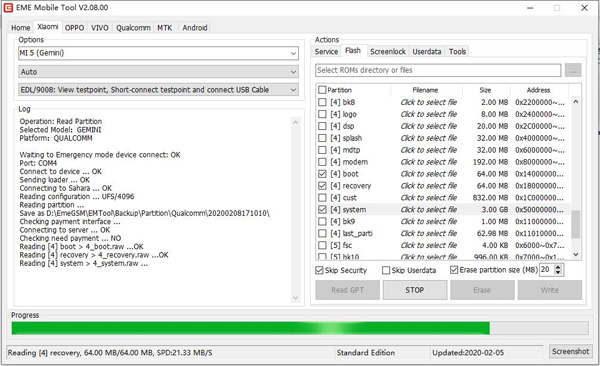
- Read Partition (Czytaj partycję)
- Erase Partition (Usuń partycję)
- Write Partition (Flash) (Napisz partycję (Flash))
- Disable Screenlock (Wyłącz blokadę ekranu)
- Enable Screenlock (Włącz blokadę ekranu)
- Read Userdata (Contacts/Calls/SMS) - Czytaj dane użytkownika (kontakty / połączenia / SMS)
- Read Userdata (Photo/Video/Music) - Czytaj dane użytkownika (zdjęcia / wideo / muzyka)
- Read Userdata (Wechat/QQ etc) - Czytaj dane użytkownika (Wechat / QQ itp.)
- Browse Userdata - Przeglądaj dane użytkownika
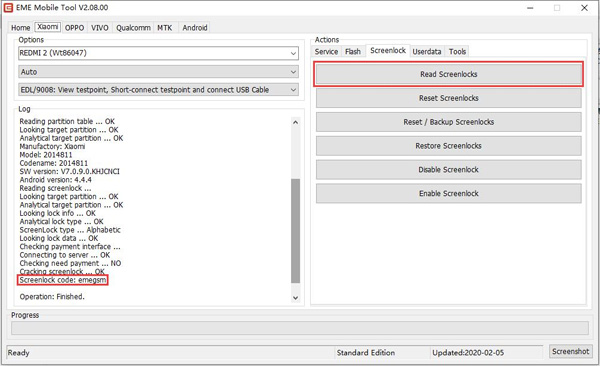
- Read Screenlocks - Czytaj blokady ekranu
- Backup Screenlocks -
- Reset Screenlocks - Zresetuj blokady ekranu
- Restore Screenlocks - Przywróć blokady ekranu
- Factory Reset -Przywrócenie ustawień fabrycznych
- Reset FRP - Zresetuj FRP
- Other features - Inne funkcje
- View Device Information
- Read GPT - Czytaj GPT
- View TestPoint - Wyświetl TestPoint
- Reboot into Normal mode - Uruchom ponownie w trybie normalnym
- Lookup/Recognition Model - odel wyszukiwania / rozpoznawania
- Boot into EDL - Uruchom do EDL

Xiaomi - Supported Features:
- Reading full information via EDL, MTK mode
- View Device Information (Board, Platform, Factory Code, Label Name) without connnect phone
- Factory Reset via Sideload mode
- Factory Reset via EDL, MTK mode
- Reset FRP via EDL, MTK mode
- Partition File Manage via EDL, MTK mode, Support Browse, Export, Rename, Erase, Replace, Delete partition files for uncryption partitions
-
Xiaomi (Qualcomm series) authentication service via EMT auth server
To perform this operation, you need EMT Credits - Flashing with additional options (Skip Security, Skip Userdata, Set Erase Size etc), Support Read GPT, Read/Erase/Write Partition as selected.
- Read/Reset/Backup/Restore Screenlocks via EDL, MTK mode for uncryption device
- Reset Screenlock without losing data for android 6.0~9.0 FDE encryption device (tested MIUI7~11)
- Read & Browse Userdata (Contacts, SMS, Calls, QQ, Wechat, Photo, Video, Music etc files) via EDL, MTK mode from uncryption device.
- View TestPoint
- Lookup Model via Sideload mode
- Reset Mi Account via flashing patch files
- Unlock Bootloader via flashing patch files
Xiaomi - Supported Models:
Auth not required (Qcom):
- REDMI 2, REDMI 2 GLOBAL, REDMI 2A, MI 3 3G, MI 4 LTE, MI 4, MI 4I, REDMI NOTE 1S, REDMI NOTE 3, MI NOTE, MI NOTE PRO, REDMI 3, REDMI 3S/3X, REDMI 4, REDMI 4 PRIME, REDMI 4A, REDMI 4X, REDMI NOTE 4X, REDMI 5, REDMI 5 PLUS, MI 4C, MI 4S, REDMI 5A, REDMI Y1 LITE, REDMI NOTE 5A, REDMI Y1, REDMI NOTE 5A PRIME, MI 5X, MI A1, MI NOTE 2, MI 5, MI 5S, MI 5S PLUS, MI MAX, MI MAX PRIME, MI MIX, MI 6, MI MIX 2, MI MAX 2, MI NOTE 3, REDMI GO
Auth not required (MTK):
- REDMI 1, REDMI 1S, REDMI NOTE 1, REDMI NOTE 2, REDMI NOTE 3, REDMI PRO, REDMI NOTE 4/4X, MI PAD 3
Skip auth (Qcom):
- REDMI NOTE 7/7S, MI 6X, MI A2, REDMI NOTE 5, REDMI NOTE 6 PRO, MI MAX 3, MI 8 LITE, MI PAD 4/PLUS
Skip auth beta (Qcom):
- REDMI 6 PRO, MI A2 LITE, REDMI S2, REDMI Y2, REDMI 7, REDMI Y3
Authentification is required (Qcom, MiCloud Off):
To perform this operation, you need EMT Credits
- REDMI 6 PRO, MI A2 LITE, REDMI S2, REDMI Y2, REDMI 7, REDMI Y3, REDMI 7A, REDMI 8, REDMI 8A, REDMI NOTE 8, MI CC9E, MI A3, REDMI NOTE 7 PRO, POCO F1, MI MIX 2S, MI MIX 3, MI 8, MI 8 EXPLORER, MI 8 PRO/UD, MI MIX 3_5G, MI 9, MI 9T PRO, REDMI K20 PRO, REDMI K20 PRO_PREMIUM, MI 9 PRO_5G, MI 8 SE, MI CC9_MEITU, MI CC9, MI 9 SE, MI 9T, REDMI K20, MI CC9 PRO, REDMI K30, REDMI K30_5G
Oppo - Supported Features:
- Reading full information via EDL, MTK mode
- View Device Information (Board, Platform, Factory Code, Label Name) without connnect phone
- Factory Reset via EDL, MTK mode
- Reset FRP via EDL, MTK mode
- Partition File Manage via EDL, MTK mode, Support Browse, Export, Rename, Erase, Replace, Delete partition files for uncryption partitions
- Flashing with additional options (Skip Security, Skip Userdata, Set Erase Size etc), Support Read GPT, Read/Erase/Write Partition as selected.
- Read/Reset/Backup/Restore Screenlocks via EDL, MTK mode for uncryption device
- Reset Screenlock without losing data for android 6.0~8.0 FDE encryption device (for unauth model)
- Disable & Enable privacy lock via EDL, MTK mode without losing data
- Read & Browse Userdata (Contacts, SMS, Calls, QQ, Wechat, Photo, Video, Music etc files) via EDL, MTK mode from uncryption device.
- View TestPoint
Oppo - Supported Models:
Qualcomm:
- 1100, 1105, 1107, 1206, 3000, 3001, 3005, 3006, 3007, A11, A30, A31, A31C, A31T, A31U, A33M, A33T, A33, A33F, A37F, A51, A51F, A51W, A51KC, A53, A53M, A53T, A57, A57T, F1F, F1W, N5206, N5207, N5209, R5S, R7C, R7F, R7G, R7KF, R7PLUSF, R7PLUSM, R7SF, R7SM, R7SPLUS, R8107, R8106, R8109, R8200, R8201, R8205, R8206, R8207, R8306, R9PLUSMA, R9PLUSTA, R9PLUSTMA, R9S, R9SK, R9ST, R9SKT, R9SPLUS, R9SPLUST, X9079, CPH1607, CPH1701, CPH1611, CPH1613, 3008, N5110, N5111, N5116, N5117, R2010, R2017, R6006, R6007, R7005, R7007, R8000, R8001, R8006, R8007, R830S, R831S, R831L, X9000, X9006, X9007, X9070, X9076, X9077
MTK:
- 1201 ,6607 ,A1601 ,A11W ,A1603 ,A33W ,R601 ,R809T ,R813T ,R815 ,R815T ,R815W ,R817 ,R817T ,R819 ,R819T ,R820 ,R821 ,R821T ,R823T ,R827 ,R827T ,R829 ,R830 ,R831 ,R831K ,R831T ,R833T ,R850 ,R1001 ,R1011 ,R2001 ,R8015 ,R8111 ,R8113 ,A37M ,A37T ,A37TM ,A59M ,A59T ,A59S ,A59ST ,R7 ,R7S ,R7ST ,R7T ,R7PLUST ,R7PLUS ,R801 ,R801T ,R803 ,R805 ,R811 ,R811W ,R829T ,R9M ,R9KM ,R9T ,R9TM ,T29 ,T703 ,U701 ,U701T ,U705T ,U705W ,U707 ,U707T ,U7011 ,U7011S ,U7015 ,X9009 ,CPH1605 ,CPH1609
Coming soon:
- A73, A71, A73T, A79, A79T, A79K, A79KT, A79_NEW, A83, A83T, A83_NEW, A85, A85T, A1, A1_NEW, A7X, A7X_NEW, A3, R15_MTK, R15_NEW
Vivo - Supported Features:
- Reading full information via EDL, MTK mode
- View Device Information (Board, Platform, Factory Code, Label Name) without connnect phone
- Factory Reset via EDL, MTK mode
- Reset FRP via EDL, MTK mode
- Partition File Manage via EDL, MTK mode, Support Browse, Export, Rename, Erase, Replace, Delete partition files for uncryption partitions
- Flashing with additional options (Skip Security, Skip Userdata, Set Erase Size etc), Support Read GPT, Read/Erase/Write Partition as selected.
- Read/Reset/Backup/Restore Screenlocks via EDL, MTK mode for uncryption device
- Reset Screenlock without losing data for android 6.0~8.0 FDE encryption device (for unauth model)
- Reset privacy lock without losing data
- Read & Browse Userdata (Contacts, SMS, Calls, QQ, Wechat, Photo, Video, Music etc files) via EDL, MTK mode from uncryption device.
- View TestPoint
Vivo - Supported Models:
MTK:
- S3+, S3, Y1, V2, E1, E1T, S6, S6T, E3, S7W, S7IT, S7T, S7, S12, S9, S9T, S11T, S11, Y3T, X1, X1S, X1ST, E5, Y17T, Y17W, Y11T, Y11IT, Y11IW, Y11_6517, Y11_6572, Y19T, X3SW, X3T, Y13, Y613, Y13T_A, Y13T_B, Y13IL_A, Y13IL_B, Y15S, Y15T, Y15W, Y22IL, Y21, Y22, Y622, Y20T, X5SL, X5L, X5 MAX+, X6D, X6L, X5 PROD, Y33, X5 MAXS, X6 PLUSD, X6 PLUSL, Y35, V3MA, Y67_A, Y67_D, Y69, Y75/A, V5, V5 LITE, V5S
Qualcomm:
- X3F, X3L, X3V, X710F, X710L, X520, X520F, Y613F, Y13L, Y913, Y21L, Y22L, X5M/X5ML, X5/X5F, X5V, Y18L, Y628, Y28L, Y928, X5 MAXF, X5 MAXL, X5 MAXV, Y627_8G, Y27_8G, Y927_8G, Y627, Y27, Y927, X6A, X6S, X6SA, Y623, Y23L, Y923, Y29L, X5 PRO/X5 PROV, Y35A, V1, Y37A, V1 MAX, Y37L, Y937, Y31, Y31L, Y51, X6 PLUSA, X6S PLUS, XPLAY 5S, XPLAY 5A, V3 MAXA, V3 MAX, V3, X7, X7 PLUS, XPLAY 6, Y55/L, Y55S, X9/X9I/X9L, X9S/X9SL, X9 PLUS, Y66/L, Y66I/A, V5 PLUS, Y53/L, X9S PLUS, Y79, V7 PLUS, X20/X20A, X20 PLUS, X20 PLUSUD, X21/X21A, X21UD/X21UDA, V7, Y65, Y71/Y71A, Y75S, Y85/A, V9 YOUTH, V9, V9 PRO, Z1 LITE, Y89, Z1/Z1I, Y71S, Y73, Y93, U1, Y91, Y95, X21S, X21 PRO, V11 PRO, X23MY_A, X23MY_E
Coming soon:
- X21I/X21IA, Y97, Z3I, V11/V11I, S1, V15, Y81/Y81S, Y83/Y83A, Y93S, Y95, Y93ST, Y3, Y91, NEX, NEX S, NEX 2_DUAL DISPLAY, X23, Z3, Z3X, V15 PRO, Z5X, Z5, X27, X27 PRO
Qualcomm - Supported Features:
- Reading full information via EDL mode
- Factory Reset via EDL mode
- Reset FRP via EDL mode
- Partition File Manage via EDL mode, Support Browse, Export, Rename, Erase, Replace, Delete partition files for uncryption partitions
- Flashing with additional options (Skip Security, Skip Userdata, Set Erase Size etc), Support Read GPT, Read/Erase/Write Partition as selected.
- Read/Reset/Backup/Restore Screenlocks via EDL, MTK mode for uncryption device
- Reset Screenlock without losing data for android FDE encryption device
- Read & Browse Userdata (Contacts, SMS, Calls, QQ, Wechat, Photo, Video, Music etc files) via EDL, MTK mode from uncryption device.
- Boot into EDL via ADB, Fasetboot mode
- Auto identify flash type (emmc, ufs) without specify the flash type
- Multiple communication without enter EDL mode again
MTK - Supported Features:
- Reading full information via MTK flash mode
- Factory Reset via MTK flash mode
- Reset FRP via MTK flash mode
- Partition File Manage via MTK flash mode, Support Browse, Export, Rename, Erase, Replace, Delete partition files for uncryption partitions
- Flashing with additional options (Skip Security, Skip Userdata, Set Erase Size etc), Support Read GPT, Read/Erase/Write Partition as selected
- Read/Reset/Backup/Restore Screenlocks via EDL, MTK mode for uncryption device
- Reset Screenlock without losing data for android FDE encryption device
- Read & Browse Userdata (Contacts, SMS, Calls, QQ, Wechat, Photo, Video, Music etc files) via EDL, MTK mode from uncryption device
- Multiple communication without enter MTK flash mode again
Android - Supported Features:
- Reading full information via ADB, Fastboot interface
- Reset FRP via ADB interface (Coming)
- Support Read GPT, Read Partition as selected
- Read/Reset/Backup/Restore Screenlocks via ADB interface (Rooted)
- Disable/Enable Screenlock via ADB for android FDE encryption device (without root)
- Read & Browse Userdata (Contacts, SMS, Calls, QQ, Wechat, Photo, Video, Music etc files) via EDL, MTK mode from uncryption device.
Samsung/Smartisan/Meitu/Gionee/Lenovo/LeEco/OnePlus/8848, etc - Coming soon:
- Reading full information via EDL, MTK mode
- View Device Information (Board, Platform, Factory Code, Label Name) without connnect phone
- Factory Reset via EDL, MTK mode
- Reset FRP via EDL, MTK mode
- Partition File Manage via EDL, MTK mode, Support Browse, Export, Rename, Erase, Replace, Delete partition files for uncryption partitions
- Flashing with additional options (Skip Security, Skip Userdata, Set Erase Size etc), Support Read GPT, Read/Erase/Write Partition as selected
- Read/Reset/Backup/Restore Screenlocks via EDL, MTK mode for uncryption device
- Reset Screenlock without losing data for android FDE encryption device
- Disable & Enable privacy lock via EDL, MTK mode without losing data
- Read & Browse Userdata (Contacts, SMS, Calls, QQ, Wechat, Photo, Video, Music etc files) via EDL, MTK mode from uncryption device.
Note! Not all models support all features. Please check the model using EMT software before attempting to service it.
|
||
NEGOTIATE PRICE

Product placed on the market in the EU before December 13, 2024: YES
Warnings and Safety Guidelines for Software Use
Based on the requirements of Regulation (EU) 2023/988 on General Product Safety (GPSR), we present a list of safety warnings. The purpose is to protect users from potential hazards resulting from improper use of products/devices/software. The warnings are formulated in a simple and understandable way to ensure accessibility for a wide audience, including elderly people and individuals with mobility limitations.
List of hazards and safety precautions for software use
1. Risk of data loss or system damage
* Hazard: improper installation, deletion of system files, or lack of backups.
* Precautions: always perform regular backups; install software only from trusted sources.
2. Exposure to cyberattacks (viruses, malware)
* Hazard: downloading files from unverified websites, lack of antivirus protection.
* Precautions: use up-to-date antivirus programs, avoid opening suspicious email attachments, enable automatic updates.
3. Hardware overload and overheating
* Hazard: intensive software use (e.g., graphics processing, floating-point calculations, BF) may lead to device overheating.
* Precautions: use the device in a well-ventilated area, do not cover ventilation openings. If overheating occurs – turn off the device and wait several minutes for it to cool down.
4. Risk of electric shock and cuts (indirect)
* Hazard: although software itself poses no physical risk, improper use of computer equipment (e.g., touching cables in a damp environment) while using programs can be hazardous.
* Precautions: never operate computer devices with wet hands, avoid working in damp rooms, and regularly check cables and casings.
5. Health risks from prolonged use
* Hazard: eye strain, back pain, wrist and shoulder discomfort caused by long hours of computer work using office software.
* Precautions: take regular breaks every 45–60 minutes, use an ergonomic chair and keyboard, and position the monitor at eye level.
6. Dangers for children and inexperienced users
* Hazard: children may accidentally download harmful programs or share personal data.
* Precautions: enable parental controls, do not leave children unattended at the computer, and educate them about safe online behavior.
7. Problems in high-humidity or high-temperature environments
* Hazard: using software in high-temperature conditions (e.g., laptop on the lap in direct sunlight) or in humid environments (e.g., kitchen, bathroom) can cause hardware failure and indirect user risks.
* Precautions: use the equipment in suitable climate conditions, avoid using it near heat sources or in high-humidity areas.
8. Risks related to maintenance and updates
* Hazard: lack of software updates may create security vulnerabilities – unskilled attempts to modify the system may result in data loss.
* Precautions: always install official updates; do not modify system files without technical knowledge. Use authorized service support.
Importance of Following Warnings
Adhering to the above warnings minimizes the risk of bodily injury, equipment failure, and material loss. Ignoring these recommendations may lead to serious health and property hazards. Ensure your safety and that of others by following the indicated precautions. Detailed warnings or safety information about the product can be found in the user manual included with the product or available as a PDF on the manufacturer’s/supplier’s website.
See also
 + |
EME Mobile Tool (EMT) - Credits
more
|
Price:
15.35 EUR w/o VAT |
This product was bought most often with:
|
+
|
EME Mobile Tool (EMT) - Credits
more
|
Price:
15.35 EUR w/o VAT |
 + |
Sigma Huawei edition Key
more
|
Price:
119.00 EUR w/o VAT |
 + |
HCU + DC Phoenix Dongle
more
|
Price:
119.00 EUR w/o VAT |
 + |
Miracle Thunder USB Dongle
more
|
Price:
129.00 EUR w/o VAT |
Note
1. Offered by us accessories and replacement parts are not original phone producer parts, but they have been carefully choosen from list of producers to offer highest quality.
2. Our company sale only hardware/HASP/Box - not software for it. Software can be found and downloaded directly from producers webpage.
3. All trademarks mentioned on this site are property of their respective companies. Including product names, logos, commercial symbols, trade names and slogans are trademarks of those respective or related companies, and are protected by international trademark laws, and they are used here only for information purpose.


