


 |
DFU Pico Dongle (PWNED, Auto-DFU)
- Product description
- Delivery cost calculator
- Wholesale orders
- Files to download
- Product safety information
DFU Pico Dongle is a hardware add-on for the checkm8 exploit, designed for data extraction from supported iPhone and iPad devices, operating in both pwned DFU and Auto-DFU modes. Based on the Raspberry Pi Pico, the device simplifies the process of switching an iPhone or iPad into DFU mode and executing the initial steps of the exploit. To unlock or extract data, a custom firmware is required, which is included free of charge with Elcomsoft iOS Forensic Toolkit or availabel for free at Github.

Compatibility in Pwned DFU Mode
Supported devices:
- iPhone 4s
- iPod Touch 5
- iPad 2 and iPad 3
- iPad Mini (1st generation)
- Apple TV 3
Supported processors:
- A5 (S5L8940)
- A5 Rev A (S5L8942)
- A5X (S5L8945)
The device must be functional enough to be switched into DFU mode.
Compatibility in Auto-DFU Mode (Automatic Switching)
Supported devices:
- iPhone 8
- iPhone 8 Plus
- iPhone X
Switching a device into DFU (Device Firmware Update) mode is a necessary step for performing low-level forensic data extraction using the checkm8 exploit. Entering DFU mode requires a precise sequence of button presses with specific timing. If any button on the device is malfunctioning, the process becomes difficult or even impossible without disassembling the device.

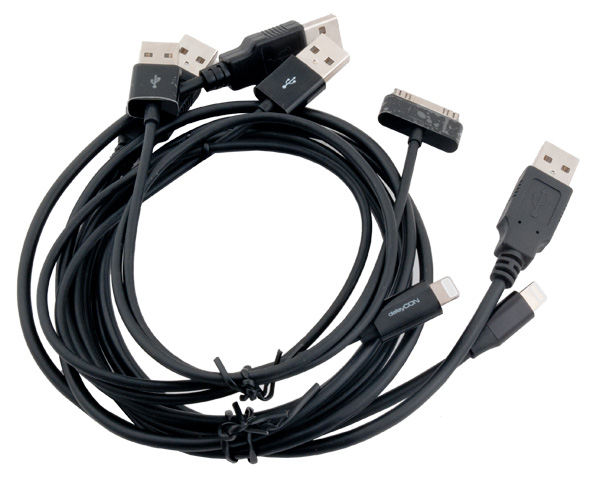
The set includes all the necessary cables for both pwned DFU and Auto-DFU modes.
Flashing the Device
For pwned DFU mode, use the file: picom8.uf2
For Auto-DFU mode, use the file: picoDFU.uf2
Flashing Process:
- Switch the device to PC mode and hold the "BOOTSEL" button.
- Connect the DFU Pico Dongle to the computer using a USB A-A cable.
- The computer will detect the device as a USB storage drive.
- To flash the firmware, drag and drop the appropriate file (picom8.uf2 or picoDFU.uf2) into the DFU Pico Dongle storage.
-
The DFU Pico Dongle will reboot and be ready for use.
- In pwned DFU mode, the mode switch remains in the same position as for PC mode.
- In Auto-DFU mode, select one of the two options: MODE 1 or MODE 2.
- In Auto-DFU mode, 5V power must be supplied (via the USB-C port), otherwise the device will not enter this mode.
Additional Information:
- MODE 2 functions similarly to MODE 1 but with reversed communication signals. This serves as an alternative if MODE 1 does not successfully enter DFU mode.
Warning:
Before connecting the DFU Pico Dongle to the target device, the device must first be switched into Recovery Mode.
Software to download from Elcomsoft IOS Forensic installation. It also works with versions from GitHub i.e. https://github.com/MattTheTekie/ipwndfu-pico and https://github.com/SmartMaster35Rus/pi-pico-checkm8-mod
|
||
NEGOTIATE PRICE

Distributor:
Multi-COM Sp. z o.o., ul. Krzaklewskiego 31b, 36-100 Kolbuszowa, e-mail: biuro@multi-com.pl, tel. +48172270025
Safety Warnings and Usage Guidelines
Based on the requirements of Regulation (EU) 2023/988 on General Product Safety (GPSR), we present a list of safety warnings. The aim is to protect users from potential hazards resulting from improper use of products/devices.
1. General Safety Measures
* Use the device only in accordance with its intended purpose and the manufacturer's instructions.
* Before first use, read the user manual carefully.
Hazards for children:
* Keep the product/device out of reach of children. Children are unable to assess existing risks.
2. Mechanical Hazards
* Check that all components are properly assembled before operating the device.
* Avoid using tools that may damage the product or contribute to its damage. Do not modify the product: do not open/disassemble it!
3. Electrical Hazards
* Connect only to a socket with the appropriate voltage, in accordance with the manufacturer’s requirements.
* Improper handling of products powered by mains voltage may result in fatal electric shock! If the product and/or the connection cable are damaged, do not touch them; there is a risk of fatal electric shock! Never use the device if the power cord is damaged, frayed, or cut. Avoid touching the power cord or plug with wet hands.
* Product with a separate power supply: before connecting the device to a plug-in or external power supply, ensure that the voltage, polarity (plus/+ and minus/-), and plug dimensions (e.g., inner/outer diameter) match the device.
* Product with a mains plug: the power outlet used for connection must be located near the product and easily accessible. Always unplug the power cord by pulling the plug, not the cable.
* Product with a power cord: the power cable must not be pinched, bent, or damaged by sharp edges. Do not place any objects on the power cord or step on it. The cable should always be arranged carefully to prevent tripping.
* Product intended for soldering: use only appropriate electronic solder and an electronic soldering iron. The soldering process should be performed quickly to avoid overheating and possible damage to the product.
4. Usage Precautions
* Place the product on a stable, flat surface to prevent it from tipping over.
* Always maintain sufficient space around the device (as recommended by the manufacturer) to ensure proper ventilation.
* The operation of certain products (e.g., machines or tools) requires the use of personal protective equipment to minimize health or other risks. This includes, for example, suitable hearing protection, an appropriate respirator/dust mask, or safety goggles, as well as proper gloves, safety footwear, and clothing.
5. Maintenance and Cleaning
* Before performing maintenance or cleaning, read the product’s user manual.
* Improper cleaning agents may not only damage the product but also cause other hazards — follow the manufacturer’s guidelines.
6. User Warnings
* Elderly persons or individuals with limited mobility should exercise particular caution when operating the product and, if necessary, seek assistance from another person.
* If the device operates abnormally (e.g., emits smoke, overheats, or produces unusual sounds), immediately switch it off, disconnect it from power, and contact authorized service.
* Store the product in a dry and cool place to prevent mechanical and electrical damage.
7. Disposal
* All electrical and electronic equipment placed on the European market must be properly disposed of. This means that, at the end of its service life, the device must be disposed of separately from unsorted household waste.
8. Importance of Following the Warnings
Following the above warnings minimizes the risk of personal injury, device malfunction, and material losses. Ignoring these recommendations may lead to serious health and material hazards. Protect yourself and your loved ones by following the indicated safety measures. Detailed warnings or product safety information are available in the user manual supplied with the product or in PDF format on the manufacturer’s/supplier’s website.
You might also be interested in:
 + |
EDL Master Harmony Dongle for XRY / Oxygen / Chimera
more
|
Price:
15.00 EUR w/o VAT |
 + |
Hydra Tool v2 EDL Cable
more
|
Price:
10.00 EUR w/o VAT |
 + |
USB COM Harmony TP Cable
more
|
Price:
15.00 EUR w/o VAT |
 + |
EDLmaster (CT-280) service adapter / cable
more
|
Price:
39.00 EUR w/o VAT |
 + |
Hero-Key (USB/EDL/HAR)
more
|
Price:
35.00 EUR w/o VAT |
 + |
USB COM 1.0 TP cable (USB C) for XRY / Oxygen / Chimera
more
|
Price:
20.00 EUR w/o VAT |
 + |
Cable for Nokia 2330C 3in1 COMBO + SLM
more
|
Price:
8.00 EUR w/o VAT |
 + |
Cable for Nokia 7600 3in1 COMBO + SLM
more
|
Price:
8.00 EUR w/o VAT |
Note
1. Offered by us accessories and replacement parts are not original phone producer parts, but they have been carefully choosen from list of producers to offer highest quality.
2. Our company sale only hardware/HASP/Box - not software for it. Software can be found and downloaded directly from producers webpage.
3. All trademarks mentioned on this site are property of their respective companies. Including product names, logos, commercial symbols, trade names and slogans are trademarks of those respective or related companies, and are protected by international trademark laws, and they are used here only for information purpose.


