


|
Main page > JTAG / EMMC / UFS Adapters // EMMC / UFS cables and adapters > EMMC adapter for Easy Z3x JTAG Box
|
 |
EMMC adapter for Easy Z3x JTAG Box
- Product description
- Delivery cost calculator
- Wholesale orders
- Files to download
- Product safety information
Features of use adapter in ISP or direct mode on Easy Z3x JTAG:
- Read/Write EMMC via ISP. (You can connect direct to phone pcb, EMMC pinouts avalable)
- Read/Write EMMC via direct connect (EMMC installed in socket).
- One click boot repair via direct emmc connection (First in the world and exclusive) (EMMC PRO activation required)
- Read MMC info (Many usefull info there such as read/write counter, error counter, etc) (EMMC PRO activation required)
- Read/Write EMMC via ISP connect (You can connect direct to phone pcb, EMMC pinouts available) (EMMC PRO activation required)
- Read/Write EMMC via direct connect (EMMC installed in socket or JTAG Socket soldered to EMMC pins) (EMMC PRO activation required)
- Pause/Resume while Reading/Writing EMMC (EMMC PRO activation required)
- Factory EMMC formatting (If you lucky may be this will help you recover bad emmc) (EMMC PRO activation required)
- Low EMMC formattin. (If you lucky may be this will help you recover bad emmc) (EMMC PRO activation required)
- Master/Slave partition activation (This function will help you choise Active partition for Boot) (EMMC PRO activation required)
- EMMC smart repartition. (One click repartion function) (EMMC PRO activation required)
- EMMC partition cloning. (EMMC PRO activation required)
Output signals available on adapter PCB:
GND, CMD, CLK, DAT0, VCC 3.3V, VCCQ 1.8V
Supported BGA EMMC chips by Easy Z3x JTAG and adapter EMMC
- Samsung GT-I9100/i9100G/i9108/i9220/i9228/N7000/i777/M250S/M250K/i9250 - EMMC CHIP SDIN5D2-4G,SDIN5C4-16G,SDIN4C2-4G,SDIN4C1-4G,SDIN5C2-8G
- Samsung GT-i9300/N7100 - EMMC CHIP KMVIS000LM-B503/KMV3U000LM-B304
- China copy I9300/N719/N7102 - EMMC CHIP KMVTU000LM-B503
- China copy I9100/N9220/N7000 - EMMC CHIP KMVYL000LM-B503
- Huawei, Levono, ZTE - EMMC CHIP KLMAG4FEJA-A001,KMVAL000LM-B304,KMSJS000KM-B308,H9DP32A4JJAC
- Google G14/G17/G18/G23 - EMMC CHIP H9TP33A6ADMC-MRKYM, KMMLL000QM-B503, KMKJS000VM-B309, KMKLL000UM-B406
- Samsung I717/727/777/E160K/E120S/T989/I929/W999/B9120/P7320 - EMMC CHIP: KMKYL000VM-B603
List of sample phones supported to work via EMMC Tool for Read/Write operation
Samsung Galaxy Note II N7100 (16GB),
Samsung GALAXY S4 (I9500/16GB),
Samsung I9300 GALAXY SIII (Unicom Edition),
Samsung I9100 GALAXY SII (16GB),
Samsung I9003 GALAXY SII (16GB),
Samsung I9300 GALAXY SIII (International Edition, 16 ??),
Samsung Galaxy i9220,
Samsung Galaxy Note N7102 II (32GB / Unico),
Samsung W2013, Samsung S7568 ,
Samsung I9300 GALAXY SIII (International Edition, 32 ??),
Samsung W999, Samsung Galaxy Note II N7100 32G,
Samsung S7572,
Samsung E120LGalaxy SII HD LTE
Samsung W899,
Samsung I9268, Samsung S7562i (Galaxy S Duos),
Samsung GALAXY ???? II N719 ,
Samsung I879,
Samsung Galaxy Note II N7102 (16GB / dual),
Samsung Galxy Note III,
Samsung Galaxy i9220 ???? (),
Samsung I939D GALAXY SIII (? ????),
Samsung GALAXY ???? II N7108 (??? ),
Samsung I9308 GALAXY SIII (??? ),
Samsung B9388, Samsung I8262D (GALAXY Dous),
Samsung I8190 GALAXY SIII Mini (16GB),
Samsung I9070 Galaxy S (8GB),
Samsung I9100 GALAXY SII ( ),
Samsung I8190 GALAXY SIII Mini (8 ??),
Samsung i9100G (GALAXY SII),
Samsung I8552 (Galaxy Win),
Samsung I9108 (GALAXY SII),
Samsung B9120 (??? II),
Samsung I8750 (ATIV S/16GB),
Samsung I9105P (GALAXY SII Plus),
Samsung I9305 (GALAXY SIII LTE),
Samsung I939 GALAXY SIII (Telecom ),
Samsung I9260 GALAXY ?? (16GB),
Samsung I8160 (Galaxy Ace 2),
Samsung GALAXY S4 (I9508 / Mobile)
Samsung N7105 (Galaxy Note II LTE),
Samsung I699 (GALAXY Trend),
Samsung I9260 GALAXY ?? (8GB),
Samsung GALAXY S4 (I959 / ? ),
Samsung I929 (GALAXY SII DUO),
Samsung I9050,
Samsung I9228, Samsung I9103 (Galaxy R),
Samsung I909 (Galaxy S),
Samsung I779,
Samsung I8250,
Samsung I8150 (Galaxy W),
Samsung I919 (GALAXY S DUOS),
Samsung GALAXY S4 (I9505 / Quad / 4G ),
Samsung I8258,
Samsung I919U (GALAXY S Duos),
Samsung GALAXY S4 (I9500/32GB),
Samsung I8530 (Galaxy Beam),
Samsung B9062,
Samsung S6358 (Galaxy Ace ???),
Samsung I9018 (Galaxy S),
Samsung I619 (Galaxy Ace ???),
Samsung I809 (Galaxy S),
Samsung N8000 (Galaxy Note 10.1),
Samsung i9200 (Galaxy Mega 6.3/16GB),
Samsung i9200 (Galaxy Mega 6.3/8GB),
Samsung S7500 (Galaxy Ace Plus),
Samsung I9208 (Galaxy Mega 6.3),
Samsung Galaxy Note 8.0 (N5100/3G + WiFi),
Samsung E210S (GALAXY SIII),
Samsung I535 (GALAXY SIII),
Samsung D710 (??? ??? 4G),
Samsung I759,
Samsung I9150 (Galaxy 5.8 Mega ),
Samsung S6352 (Galaxy Ace ?)
Samsung S7508 (Galaxy Ace Plus),
Samsung S5698 (Galaxy Xcover),
Samsung S7530 (OMNIA M),
Samsung GALAXY SIII (TD-LTE ),
Samsung I659 (Galaxy Ace Plus),
Samsung I717 (Galaxy Note),
Samsung I9300 GALAXY SIII (International Edition, 64 ??),
Samsung I9020 (Nexus S),
Samsung GALAXY SII i9100G (Tencent ),
Samsung I9220 Galaxy Note (Extreme Edition),
Samsung S6108 (Galaxy Y POP)
Samsung I9023 (Nexus S),
Samsung I8558 (Galaxy Win),
Samsung Galaxy Tab 7.7 P6800 (16 ?? ),
Samsung S7530E (OMNIA M),
Samsung B5330 (Galaxy Chat),
Samsung I8730 (Galaxy Express),
Samsung I9205 (Galaxy Mega 6,3),
Samsung I747 (GALAXY SIII),
Samsung I9070 Galaxy S (16GB),
Samsung I339,
Samsung I9100 GALAXY SII (32GB),
Samsung I9100 GALAXY SII (Unicom Edition),
Samsung GALAXY S4 (I9500/64GB),
Samsung I519, Samsung E110S (Celox),
Samsung I667 ( 2),
Samsung I9210 (Galaxy SII LTE),
Samsung S6500D,
Samsung T889 (Galaxy Note II),
Samsung I727 (Galaxy SII ??),
Samsung I8750 (ATIV S/32GB)
Samsung S5300 (Galaxy ???),
Samsung i9088 (Galaxy S),
Samsung L710 GALAXY SIII ( ),
Samsung I9080 (GALAXY ),
Samsung T989 (Hercules),
Samsung S6812i,
Samsung B5510 (GALAXY Y Pro),
Samsung I777 (),
Samsung S6500 (Galaxy Mini 2),
Samsung E170K (Galaxy R Style),
Samsung I930 (ATIV Odyssey),
Samsung E220 (GALAXY Pop/8GB),
Samsung S7272 (Galaxy Ace 3),
Samsung S5280 (GALAXY Star)
Samsung I9152 (Galaxy Mega 5,8),
Samsung i677 ( Flash),
Samsung S7710 (Galaxy Xcover 2),
Samsung E220 (GALAXY Pop/16GB),
Samsung S6012 (Galaxy Music Duos),
Samsung S6810 (Galaxy ),
Samsung R830 (Galaxy Axiom),
Samsung GALAXY SIII +,
Samsung S5301 (Galaxy Pocket Plus),
Samsung S6812 (Galaxy ),
Samsung I547 (Galaxy Rugby Pro),
Samsung I6282D (Galaxy Core),
Samsung M950 (Galaxy Reverb),
Samsung I437 (Galaxy Express),
Samsung S6312 (GALAXY ? Duos),
Samsung T699 (???? 4G Galaxy S),
Samsung S6310 (GALAXY Young),
Samsung M340S (Galaxy M),
Samsung L300 (Galaxy 4G LTE),
Samsung I847 ( SMART),
Samsung Galaxy SII WiMAX,
Samsung S759 (Omnia M),
Samsung I577 (Galaxy Exhilarate),
Samsung I405 (Galaxy Metrix 4G),
Samsung E310S (Mega Galaxy 6.3),
Samsung T959 (???? 4G),
Samsung M190S (Galaxy S Hoppin),
Samsung I7500U Samsung,
Samsung I757 (Galaxy SII ??? HD),
Samsung Nexus S 4G
Pboto of adapter
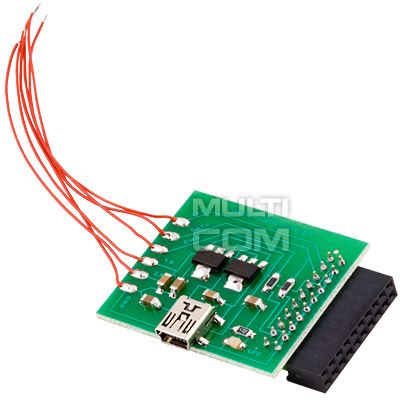
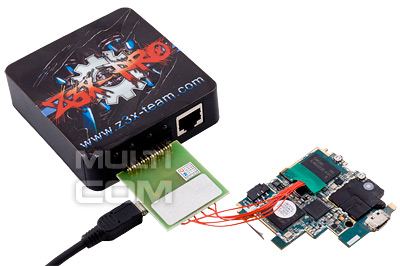
Photo of I9000 with demaged JTAG pins connected via EMMC adapter
Make sure that adapter are connected as on photo shown
FAQ:
Question: Can I repair EMMC CHIP (suddenly dead phones)
Answer: No. At this moment you can't repair demaged EMMC chip
Question: Can I repair Suddenly dead phones ?
Answer: Yes if something was erased in EMMC CHIP you can repair it.
Question: Can i repair boot on phone with disable JTAG?
Answer: Yes you can. (N7100,I9300 boot inside ROM2, after write ROM2 phones back to work)
Question: Can i repair dead phones I9082, i9105, S6810P with disabled JTAG, after touch ROM2.
Answer:Yes you can. Just need write ROM2 via EMMC direct connection.
Complete contains:
- adapter EMMC Multi-COM for Easy Z3x JTAG box
- warranty
Warranty
We offer 12 months of warranty for this products
|
||
NEGOTIATE PRICE

Product placed on the market in the EU before December 13, 2024: YES
Safety Warnings and Usage Guidelines
Based on the requirements of Regulation (EU) 2023/988 on General Product Safety (GPSR), we present a list of safety warnings. The aim is to protect users from potential hazards resulting from improper use of products/devices.
1. General Safety Measures
* Use the device only in accordance with its intended purpose and the manufacturer's instructions.
* Before first use, read the user manual carefully.
Hazards for children:
* Keep the product/device out of reach of children. Children are unable to assess existing risks.
2. Mechanical Hazards
* Check that all components are properly assembled before operating the device.
* Avoid using tools that may damage the product or contribute to its damage. Do not modify the product: do not open/disassemble it!
3. Electrical Hazards
* Connect only to a socket with the appropriate voltage, in accordance with the manufacturer’s requirements.
* Improper handling of products powered by mains voltage may result in fatal electric shock! If the product and/or the connection cable are damaged, do not touch them; there is a risk of fatal electric shock! Never use the device if the power cord is damaged, frayed, or cut. Avoid touching the power cord or plug with wet hands.
* Product with a separate power supply: before connecting the device to a plug-in or external power supply, ensure that the voltage, polarity (plus/+ and minus/-), and plug dimensions (e.g., inner/outer diameter) match the device.
* Product with a mains plug: the power outlet used for connection must be located near the product and easily accessible. Always unplug the power cord by pulling the plug, not the cable.
* Product with a power cord: the power cable must not be pinched, bent, or damaged by sharp edges. Do not place any objects on the power cord or step on it. The cable should always be arranged carefully to prevent tripping.
* Product intended for soldering: use only appropriate electronic solder and an electronic soldering iron. The soldering process should be performed quickly to avoid overheating and possible damage to the product.
4. Usage Precautions
* Place the product on a stable, flat surface to prevent it from tipping over.
* Always maintain sufficient space around the device (as recommended by the manufacturer) to ensure proper ventilation.
* The operation of certain products (e.g., machines or tools) requires the use of personal protective equipment to minimize health or other risks. This includes, for example, suitable hearing protection, an appropriate respirator/dust mask, or safety goggles, as well as proper gloves, safety footwear, and clothing.
5. Maintenance and Cleaning
* Before performing maintenance or cleaning, read the product’s user manual.
* Improper cleaning agents may not only damage the product but also cause other hazards — follow the manufacturer’s guidelines.
6. User Warnings
* Elderly persons or individuals with limited mobility should exercise particular caution when operating the product and, if necessary, seek assistance from another person.
* If the device operates abnormally (e.g., emits smoke, overheats, or produces unusual sounds), immediately switch it off, disconnect it from power, and contact authorized service.
* Store the product in a dry and cool place to prevent mechanical and electrical damage.
7. Disposal
* All electrical and electronic equipment placed on the European market must be properly disposed of. This means that, at the end of its service life, the device must be disposed of separately from unsorted household waste.
8. Importance of Following the Warnings
Following the above warnings minimizes the risk of personal injury, device malfunction, and material losses. Ignoring these recommendations may lead to serious health and material hazards. Protect yourself and your loved ones by following the indicated safety measures. Detailed warnings or product safety information are available in the user manual supplied with the product or in PDF format on the manufacturer’s/supplier’s website.
Other products from same category
 + |
Universal adapter for JTAG Box
more
|
Price:
6.00 EUR w/o VAT |
 + |
RIFF Box JTAG/EMMC ORIGINAL
more
|
Price:
119.00 EUR w/o VAT |
 + |
ORT EMMC Booster
more
|
Price:
39.00 EUR w/o VAT |
 + |
OctoPlus Box Full (LG+SAM+JTAG) 2in1
more
|
Price:
299.00 EUR w/o VAT |
 + |
EMMC Adapter for Nokia Lumia 535
more
|
Price:
18.00 EUR w/o VAT |
Suggested hardware for use with above tool
Below you will find special hardware that it's suggested to use with this tool.
 + |
Z3x Qualcomm Unlock credits
more
|
Price:
45.00 EUR w/o VAT |
See also
 + |
Flat tape 20 pin for JRT/ORT/RIFF
more
|
Price:
3.50 EUR w/o VAT |
 + |
S-Boot Repair cable for Samsung
more
|
Price:
12.00 EUR w/o VAT |
 + |
Adapter for Medusa/Octoplus 20PIN-RJ48
more
|
Price:
3.00 EUR w/o VAT |
 + |
Configurable set of JTAG adapters for Samsung
more
|
Price:
75.00 EUR w/o VAT |
 + |
Configurable set of JTAG adapters for HTC
more
|
Price:
80.00 EUR w/o VAT |
 + |
ICFRIEND Easy-UFS 4in1 socket set
more
|
Price:
299.00 EUR w/o VAT |
 + |
GPG EMMC JTAG Box Full + 33 JIG
more
|
Price:
199.00 EUR w/o VAT |
 + |
Adapter eMMC/JTAG for Riff BOX 2 - RC2000
more
|
Price:
10.00 EUR w/o VAT |
 + |
EMMC Z3X JTAG Pro 3in1 Adaptor
more
|
Price:
10.00 EUR w/o VAT |
This product was bought most often with:
 + |
JTAG for Samsung i9505/M919/i337 (Galaxy S4)
more
|
Price:
10.00 EUR w/o VAT |
 + |
Easy Z3X Plus FULL (Easy Jtag Plus Box)
more
|
Price:
419.00 EUR w/o VAT |
|
+
|
S-Boot Repair cable for Samsung
more
|
Price:
12.00 EUR w/o VAT |
 + |
PROBE cable for Riff JTAG Box
more
|
Price:
8.00 EUR w/o VAT |
 + |
JTAG for Samsung I747/I747M/T999/T999V (Galaxy S3)/I9190/I9195 (S4 Mini)
more
|
Price:
11.00 EUR w/o VAT |
|
+
|
Flat tape 20 pin for JRT/ORT/RIFF
more
|
Price:
3.50 EUR w/o VAT |
 + |
JTAG for Samsung i9100/i9100P (Galaxy S2)
more
|
Price:
11.00 EUR w/o VAT |
Note
1. Offered by us accessories and replacement parts are not original phone producer parts, but they have been carefully choosen from list of producers to offer highest quality.
2. Our company sale only hardware/HASP/Box - not software for it. Software can be found and downloaded directly from producers webpage.
3. All trademarks mentioned on this site are property of their respective companies. Including product names, logos, commercial symbols, trade names and slogans are trademarks of those respective or related companies, and are protected by international trademark laws, and they are used here only for information purpose.


